
Summon a usable attacker, equip it, enter Story and watch what happens when enemies reach its range. Follow the Anime Galaxies beginner guide in order, then spend your next resources on the problem your first run reveals.
The interface walkthrough is based on published gameplay images. Team-planning advice is editorial guidance, not a promise of a particular clear or reward.
Anime Galaxies beginner guide: orient yourself
Enter the experience by Champions TD. Give the lobby time to load before following a guide for a similarly named Roblox game. Locate the summon area, your unit inventory and the entry to Story before spending scarce resources.
A code can help with early resources, but it is not a requirement to follow this Anime Galaxies beginner guide. Some reported codes have level gates. Check their requirements instead of repeatedly trying strings intended for later accounts.
Anime Galaxies beginner guide: first summons
Inspect the banner and its cost before summoning. After obtaining a unit, open its information and understand what it can do. Do not assume every character is an attacker or that every rare character can hit air enemies.
The Anime Galaxies beginner guide prioritizes a usable opening over collecting names. Keep a unit that can defend early, then look for a complementary role. Avoid selling unfamiliar support or economy units simply because their damage number is smaller.
Evidence: AllThings.How — first-battle walkthrough and screenshots
Prepare your first Story team
Check the equipped bar rather than assuming a newly summoned unit was added automatically. Read placement cost, targeting and range. If a useful ability appears only after an upgrade, plan for the money needed to reach it.
This Anime Galaxies beginner guide uses roles to explain why a team works. One attacker gives you an opening; additional coverage handles what it misses; control buys time. An economy unit becomes helpful only when the defense can survive while you invest in it.
- Confirm at least one affordable combat unit is equipped.
- Check which enemy types your lineup can target.
- Keep your first upgrade plan simple enough to follow during a wave.
- Save valuable materials until you understand which unit you will keep.
Your first battle: placement and upgrades
The published first-act walkthrough shows Hidden Village, a Ready prompt, a unit bar and the enemy path. Start by placing a defender where enemies remain inside its range for a useful stretch. Read the placement feedback before confirming.
- Enter the available Story act and inspect the lane before starting.
- Select an affordable unit from the equipped bar and place it near useful path coverage.
- Start the wave and watch whether the unit can reach and damage the enemies.
- Use battle money to upgrade a useful position or cover a leak, rather than scattering purchases.
- Keep a normal pace while learning; only accelerate once you understand the controls.
- Read the result and identify the first point where the defense struggled.
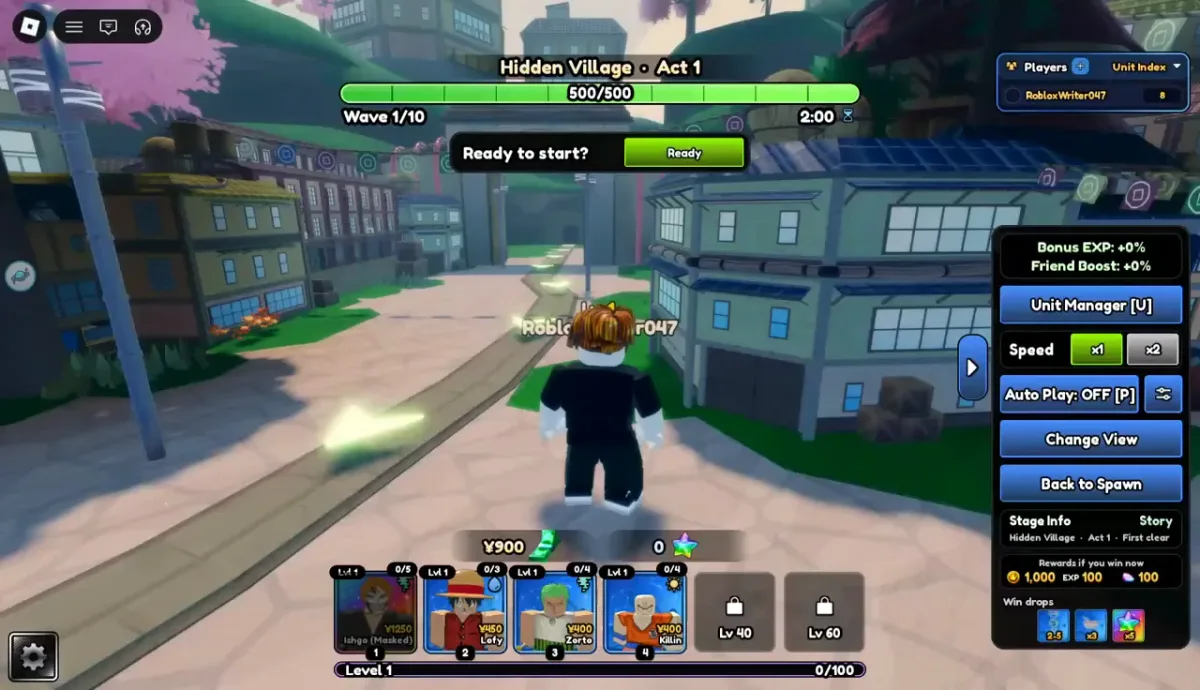
Evidence: AllThings.How — first-battle walkthrough and screenshots
Resource priorities in the Anime Galaxies beginner guide
Separate account progression from money earned during a match. Before pressing an upgrade button, read which balance it spends. A useful early habit is to make one intentional investment and observe the result.
| Resource | Purpose | Early priority |
|---|---|---|
| Gems | Summoning and other listed purchases | Read the actual banner before spending. |
| Trait Crystals | Trait investment | Choose a unit you expect to keep. |
| Stat Tokens / Locks | Stat adjustment tools | Read the stat interface; these are not trait currency. |
| Evolution materials | Form upgrades | Verify the full recipe before crafting. |
| Battle money | Placement and upgrades inside a run | Keep the opening defense affordable. |
Anime Galaxies beginner guide: after your first clear
Repeat a stage if you still cannot explain which placement made it work. A consistent clear is a better foundation than immediately selecting the hardest option. The developer advertises Nightmare and challenges as further progression systems; inspect their conditions before entering.
Use the Anime Galaxies beginner guide as a troubleshooting loop. Lost to an air wave? Check target coverage. Ran out of time on a boss? Review focused damage and upgrade timing. Failed while saving money? Strengthen the opening before adding more economy.
Move toward portals when you can field a reliable team and understand the relevant entry requirements. The Anime Galaxies beginner guide does not recommend consuming special entries simply to discover that a required role is missing.
Evidence: Roblox — Champions TD experience
Anime Galaxies Beginner Guide: questions & answers
What should I do first in this Anime Galaxies beginner guide?
Identify the correct game, summon and equip a usable attacker, then learn the first Story battle. Avoid expensive long-term upgrades until you understand the unit's role.
Which units should beginners keep?
Keep enough damage to open a run, plus useful targeting, support or economy options. Check unfamiliar roles before selling; rarity alone does not measure usefulness.
When should I try Nightmare?
Try a harder option after ordinary clears become reliable and you understand the entry screen. The Anime Galaxies beginner guide cannot guarantee a particular level or lineup will clear it.
Does the Anime Galaxies beginner guide require paid boosts?
No purchase is part of this walkthrough. Learn the interface and evaluate your roster before deciding whether any optional purchase is useful.
Sources & corrections
Source links support the specific sections above. Publisher reports are not our own gameplay tests. If your game screen differs, send the page, unit or system name, and a screenshot through our contact page.