
Check whether Anime Galaxies autoplay says ON or OFF before relying on it. The screenshot below shows OFF, a P key hint, x1/x2 speed buttons and a settings icon. It does not demonstrate automatic placement or prove what every setting does.
Visible controls are supported by the screenshot. Simple/complex mode references come from a third-party update transcription; their behavior has not been independently tested here.
Where to find Anime Galaxies autoplay
Enter a battle and inspect the panel on the right side of the screen. In the documented Hidden Village interface, the Auto Play control sits below the speed row and beside a small settings button. The Unit Manager button is above that row.
This Anime Galaxies autoplay image is a battle screenshot, not a simulation. The manager panel is not open, and no sequence of automatic unit actions is visible. Match the layout to your device rather than assuming the screenshot demonstrates a complete setup.
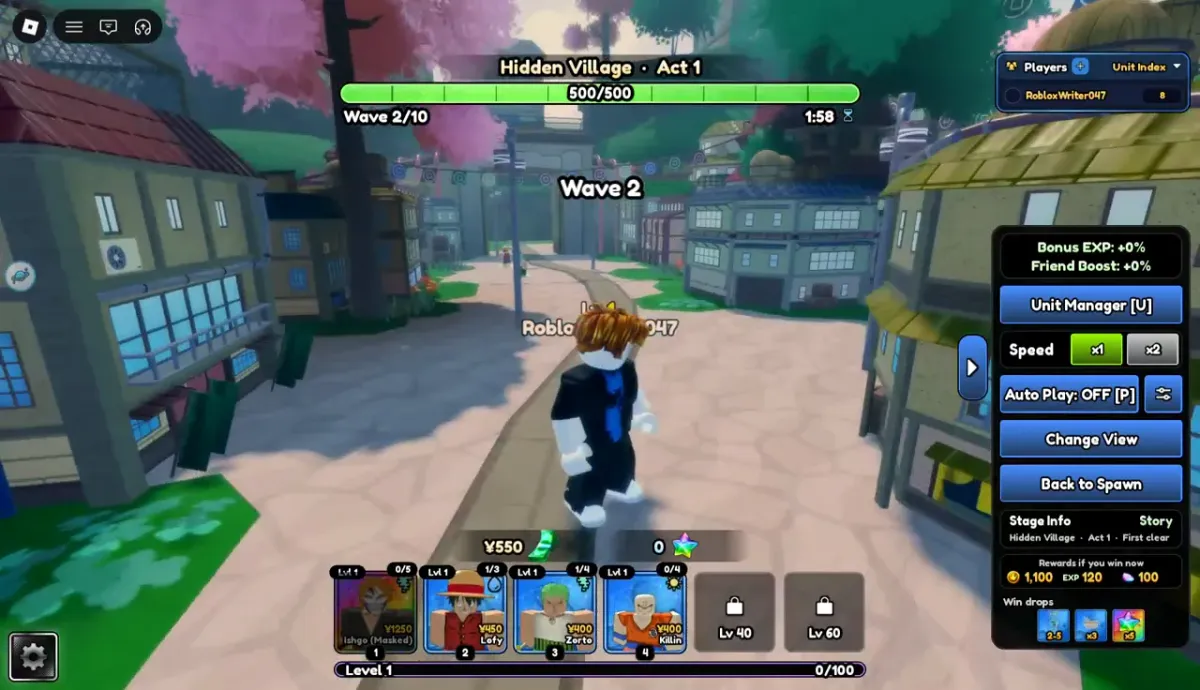
Read the Anime Galaxies autoplay controls
The visible state is the first thing to check when a run behaves differently from what you expected. Speed and automation are separate controls; selecting a faster speed does not establish that placement or upgrading has been automated.
| Control | Visible label or state | What the image establishes |
|---|---|---|
| Auto Play | OFF [P] | An off state and a keyboard hint are displayed. |
| Speed | x1 highlighted; x2 available | Separate speed choices are shown. |
| Settings icon | Beside Auto Play | An entry to settings exists; its contents are not shown. |
| Unit Manager | [U] hint | A manager button exists; no opened manager is pictured. |
Changing Anime Galaxies autoplay settings
Use the visible control to inspect or change the state, then read the result on screen. If you open the settings panel, review its options before confirming. Start on a familiar stage where you can observe the first wave and stop if the behavior differs from your plan.
- Check the Auto Play label before touching the controls.
- Open the adjacent settings entry if you need to inspect options.
- Review any placement, upgrade or mode settings that your actual panel exposes.
- Test one change on a familiar battle and watch what happens.
- Return to manual control if you cannot explain the actions being taken.
Simple and complex Anime Galaxies autoplay modes
A third-party transcription of developer announcements refers to simple/complex modes and an in-game settings toggle. Those reports establish what the publisher says changed, not a verified explanation of each option.
This Anime Galaxies autoplay guide therefore does not supply an invented configuration recipe. If your panel offers multiple modes, compare their descriptions and test them separately. Do not import settings from another anime tower defense game.
Evidence: Roblox Wiki — third-party transcription of update announcements
When manual play is more useful
Keep manual control while learning a new lane, checking an unfamiliar unit or diagnosing a failed run. You need to see whether a problem comes from targeting, placement or spending. Changing several automatic settings at once makes that harder to identify.
Anime Galaxies autoplay should not be treated as proof that an unattended run is safe or efficient. The screenshot cannot establish recovery after a disconnect, reward collection, automatic replay or performance on a difficult stage.
Troubleshoot Anime Galaxies autoplay
If nothing appears to happen, first check the displayed state and whether your chosen mode needs additional configuration. If the controls look different, open the in-game settings and compare the current labels. A screenshot from another build may show a different arrangement.
The P hint is visible, but this site has not tested keyboard shortcuts or controller equivalents. Use the actual button when checking the state. If the interface itself fails to load, confirm that you are in the correct experience and that the Roblox client is functioning.
Anime Galaxies Autoplay: questions & answers
Where is the Anime Galaxies autoplay button?
The documented battle screen places it on the right, below the speed controls and beside a settings icon.
Does Anime Galaxies autoplay automatically place units?
That behavior has not been independently verified here. A screenshot of the button cannot establish placement, upgrade order or replay behavior.
Does x2 turn on Anime Galaxies autoplay?
No such link is established by the image. Speed and Auto Play are separate visible controls; inspect each state independently.
Can I press P for Anime Galaxies autoplay?
The screenshot displays [P] beside the button, but the shortcut behavior has not been tested here. Check the on-screen control and the bindings in your game.
Sources & corrections
Source links support the specific sections above. Publisher reports are not our own gameplay tests. If your game screen differs, send the page, unit or system name, and a screenshot through our contact page.